For work that keeps going when you leave
Keep your Mac awake. Control it from your iPhone.
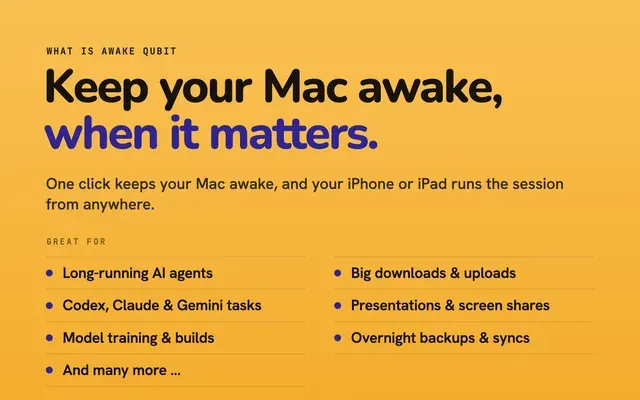
Start a long job and walk away: an AI agent in Codex, Claude Code or Gemini CLI, a build, a render, an overnight upload. Your Mac stays awake as long as you need, then sleeps on its own.
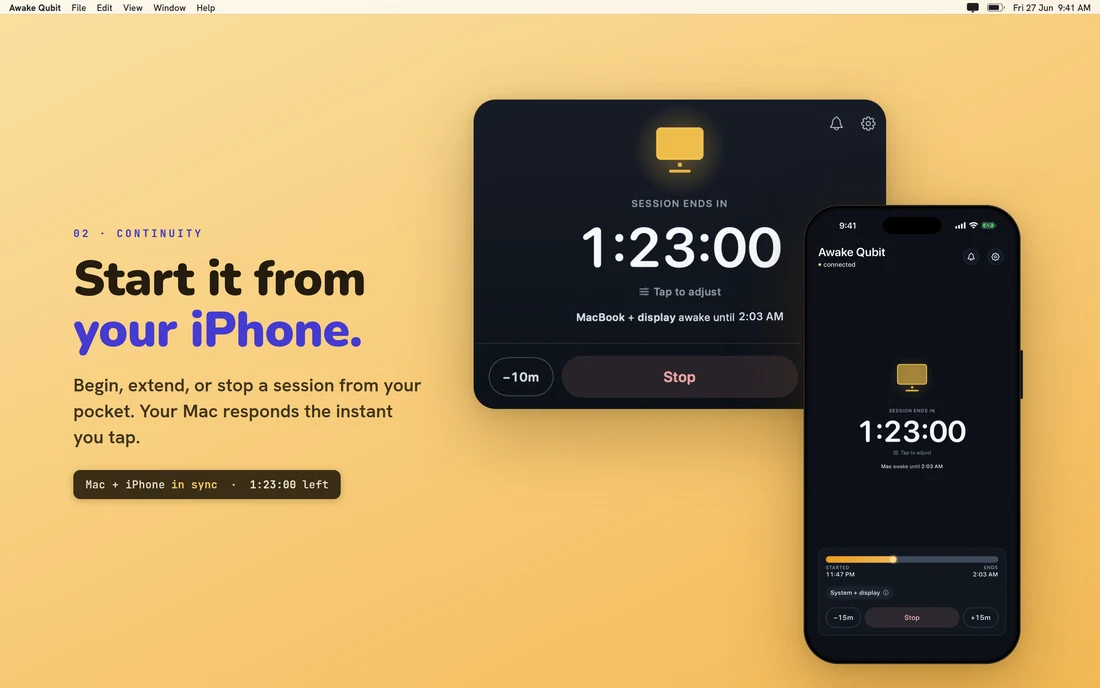
Check the countdown on your phone. Add time, stop early or lock the screen without walking back to your desk.
Free on your Mac forever, with no account. Pro adds your iPhone: remote control, remote screen lock, sleep alerts, Smart Pause and advanced notifications.
Requires macOS 14 Sonoma or later. The Mac app lives in the menu bar.

Made for jobs like these.
Your Mac sleeps at the worst moment.
You start a 40-minute job, grab a coffee, and come back to a Mac that fell asleep at minute nine. The agent stopped. The build never finished. Now you have to explain it all again and wait while it redoes half the work.
So you turn sleep off completely. Then you forget, and your laptop runs hot in your bag with a dead battery by morning.
Awake Qubit fixes both. It keeps your Mac awake for as long as the job needs, tells you when the session ends, and lets the Mac sleep again on its own.
Yes, caffeinate keeps a Mac awake. It just can't tell you when it stops.
Keeping a Mac awake isn't hard, and we won't pretend it is. Awake Qubit uses the
same documented method as Apple's own caffeinate tool: one power
assertion through the public IOKit API. If you have a terminal, you already have
that part.
What a terminal command can't do is stop itself when your battery gets low, tell you when it stopped, or let you change it from the other side of the building.
Some AI agents keep the Mac awake on their own, but only while they're working. Awake Qubit covers the whole Mac: the builds and tests your agent starts, the other work in the next window, and the time after it finishes. And you can see the countdown on your phone either way.
Good to know: Awake Qubit keeps your Mac awake. It doesn't watch your agent or know when a task is done. See what it can't do.

What a terminal command can't show you: the time left, and buttons to change it.
Your AI agent keeps going when you step away.
Codex, Claude Code, Gemini CLI, a fine-tune, a local model, a 40-step plan you started at 11 PM. The job needs your Mac, not you.
- Choose when it stopsFree After a set time, at a clock time like 6:00 PM, when an app you pick quits, or when the battery drops to a level you set. Or keep it on until you stop it.
- Link it to the app doing the workFree Pick your terminal, your editor or any Mac app. The session lasts while that app is open and ends the moment it quits.
- See how it's going at a glanceFree The countdown sits on your iPhone Lock Screen, one status shows whether your phone can reach your Mac, and every start, extension and stop is logged with the device it came from.
- Change it from anywherePro Add two hours from the couch, stop early, choose whether the screen stays on too, or lock the screen and let the job keep running.
Closing the lid still wins. Unless an external display is connected, macOS sleeps when you close the lid, and no App Store app can stop that. The Mac shows a reminder while a session runs, so you're never guessing.

Run it all night. Your battery will be fine.
Final Cut exports, Xcode archives, Blender renders, audio bounces, big dataset downloads, cloud sync, Time Machine. You never know exactly how long they'll take, so any timer is a guess. Guess wrong and you lose the work.
- Stop when the app quits, not on a timerFree Pick the app doing the work, and the session ends the moment that app quits. No guessing.
- Stop at a battery levelFree The session stops on its own when the battery drops to the level you pick (the picker shows your current charge), so an unplugged laptop never runs itself flat finishing a transfer.
- Safety warnings are freeFree While a session runs, Awake Qubit watches for overheating that won't let up, a very low battery on an unplugged Mac, and an almost full disk, and warns you on the Mac and your paired iPhone. A safety warning should never cost extra.
- Pro shows battery drain, time left and heatPro How fast the battery is draining and roughly how long it will last, how hot the Mac is and for how long, and an End Session button right on the alert.
You never pay for the warning. You pay for what to do about it.

Find out right away, not nine hours later.
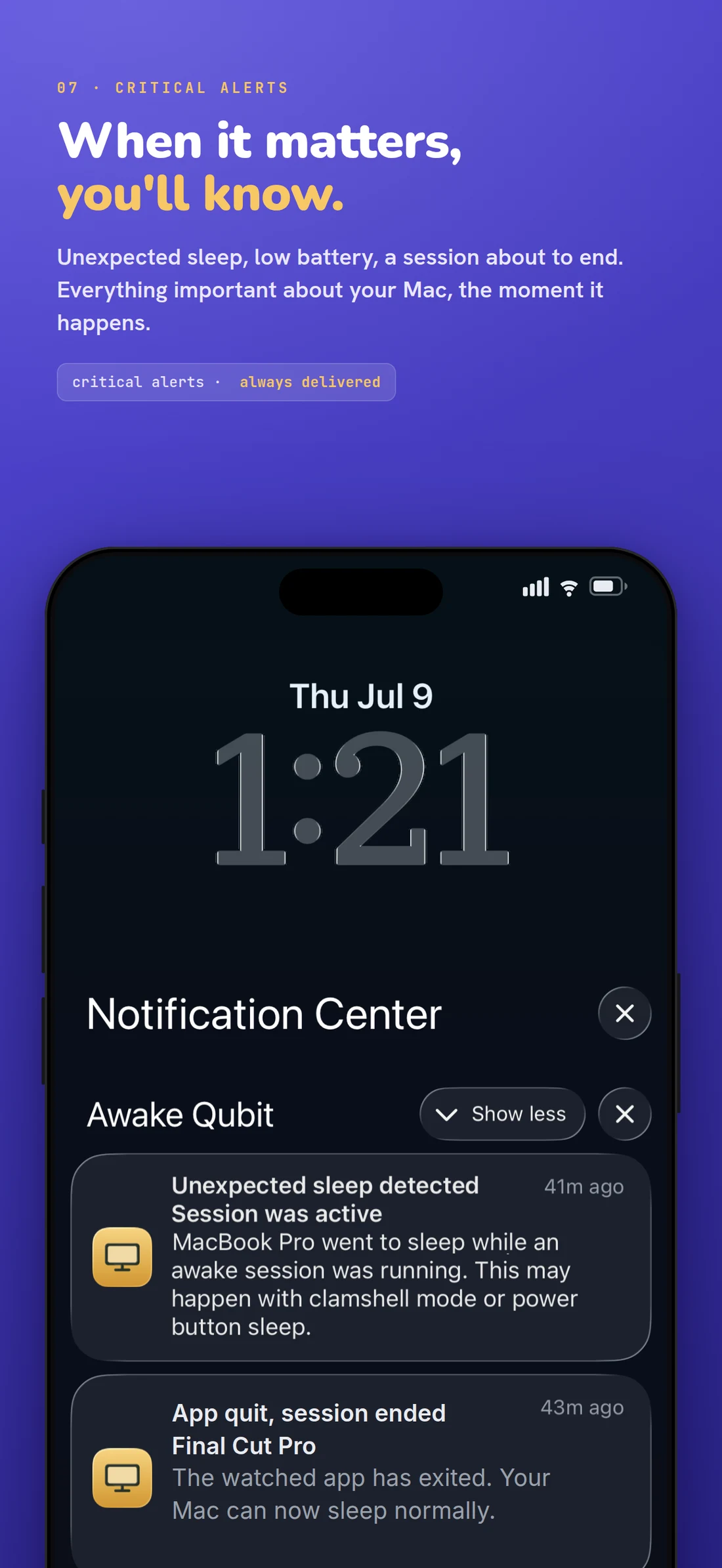
Sometimes a session gets cut short anyway. Someone closes the lid, the power button gets bumped, or macOS makes a call you didn't.
- Awake Qubit notices and tells youFree If your Mac sleeps during a session, it's written into the timeline. A Live Activity on your iPhone Lock Screen shows the countdown, the awake mode and whether Smart Pause has paused it. One status tells you if your Mac is connected, asleep, reconnecting, unreachable or not paired.
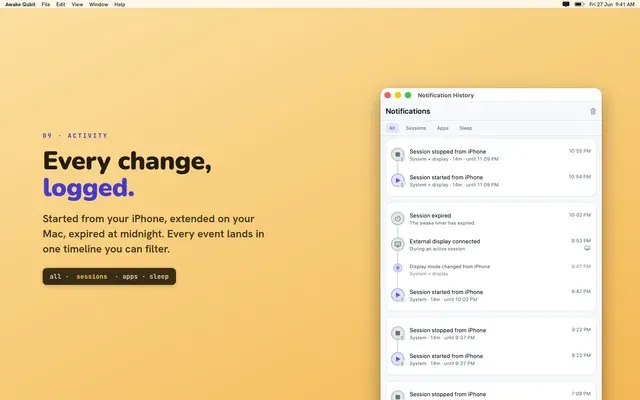
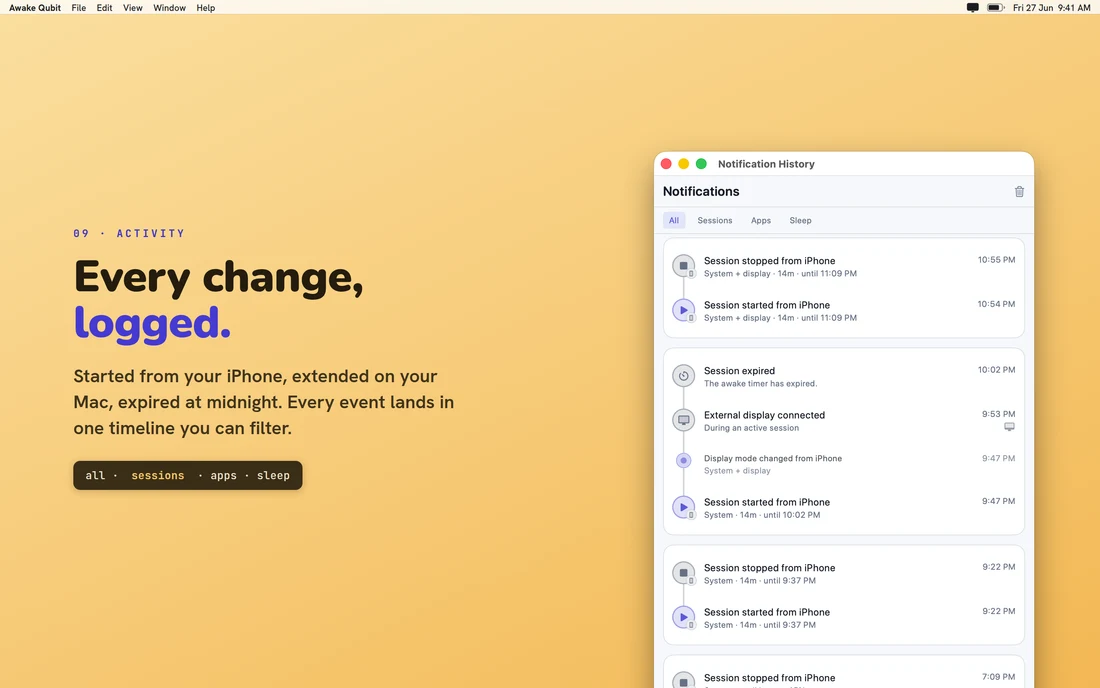
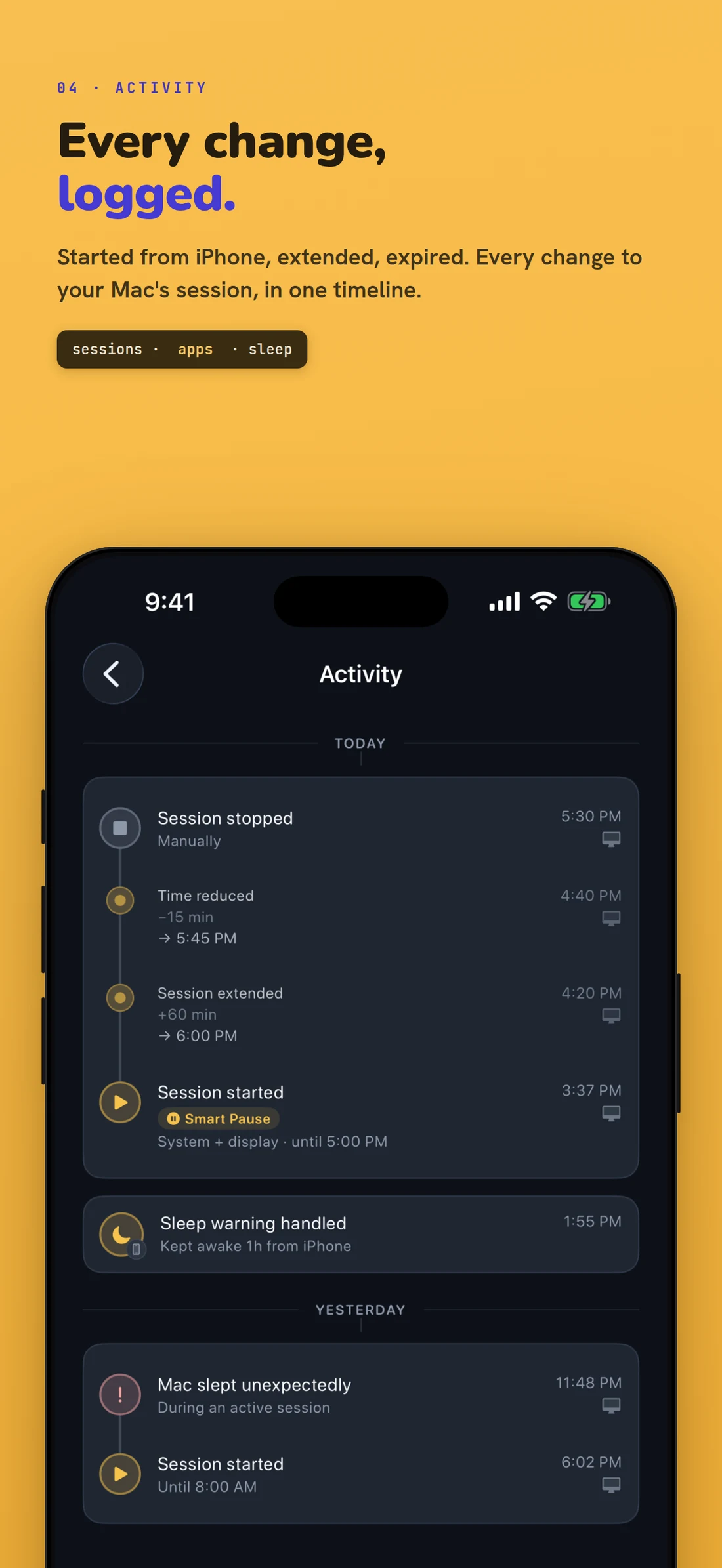
- Activity logs every changeFree Started, extended by 60 minutes, cut by 15, stopped from iPhone, display setting changed, screen locked, Mac slept unexpectedly. Every entry has a time, can be filtered, and shows the device it came from.
- If sync gets stuck, you'll knowFree If the Mac's iCloud sync gets stuck, the Mac tells you how to fix it, instead of your Mac and iPhone showing different things. The session keeps running the whole time.
- Sleep alerts on your phonePro An alert when a session ends, or when your Mac sleeps unexpectedly.
If your Mac slept when it shouldn't have, the log shows it in red instead of pretending everything was fine.

Lock the screen. Keep the job running.
Locking isn't sleeping. A locked Mac keeps working.
You're done at your desk, but your Mac isn't. One tap on your iPhone locks the Mac's screen while the session keeps running. The build, the render, the agent and the upload all keep going. Your screen is private, your work isn't interrupted, and you didn't have to walk back.
Every lock shows up in Activity as Screen locked, with the device that sent it, so you know it worked.
What it needs: a Mac that's awake with Awake Qubit running, and a one-time Automation and Accessibility approval (the app walks you through it). It isn't Find My or device management. It can't wake a sleeping Mac or lock one that's already asleep.

Your timer only counts down while you're away.
Most keep-awake apps make you pick a number and hope. The timer counts down even while you're still at your desk, so the hour you needed for when you're away runs out early.
With Smart Pause, a timed session only counts the time you're actually away. The countdown freezes while you're typing, clicking, on a call, on camera or presenting full screen, then starts again after a short wait you choose.
The Mac shows a live Resuming in countdown, and your iPhone shows the same paused timer, so both screens agree.
No permission prompts. It doesn't ask for microphone, camera or Accessibility access, and there's nothing to approve in System Settings. Smart Pause works on timed sessions only. The other kinds end on their own condition: a clock time, an app quitting, a battery level, or you stopping them.

Everything your Mac does on its own is free, forever.
- Every way to end a session. After a set time, at a clock time, when an app quits, at a battery level, or when you stop it.
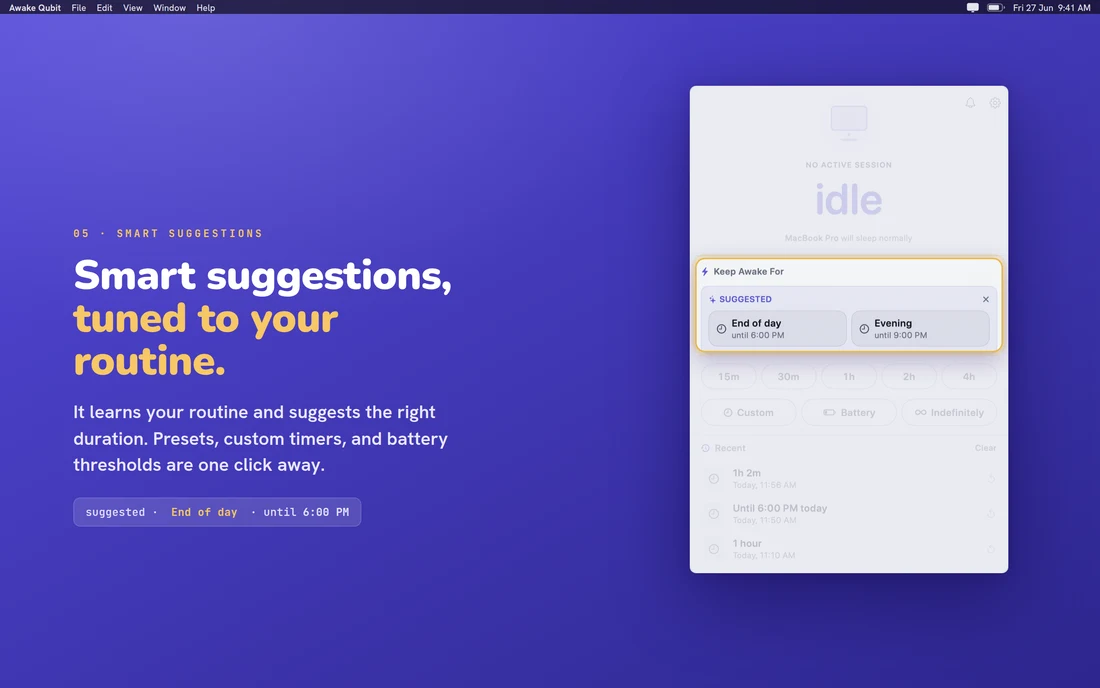
- Smart suggestions and recent sessions. Computed on your Mac from your own use, with no model, no permissions and nothing to train. They travel only to your own private iCloud, encrypted so only your devices can read them.
- Session notifications, the full activity feed, and session history.
- Critical safety alerts for overheating, low battery and a full disk.
- Mouse Wiggler on your Mac, which moves the cursor a little when you step away.
- See what's keeping your Mac awake. A live list of every app that's
stopping your Mac from sleeping, with its name and bundle ID, the kind of hold it
has, the reason it gives, and how long it's been holding on. If you use
pmset -g assertions, it's that list with readable names and reasons, live, in a window you can leave open. - Pair your iPhone and watch your Mac for free: session, battery and connection. Watching is free. Changing things from your phone is Pro.
That list includes us. If Awake Qubit is what's keeping your Mac awake, it shows up there like any other app.
The same screens you'll see in the App Store.
Tap or click any screen to see it full size.
-
 (view larger)
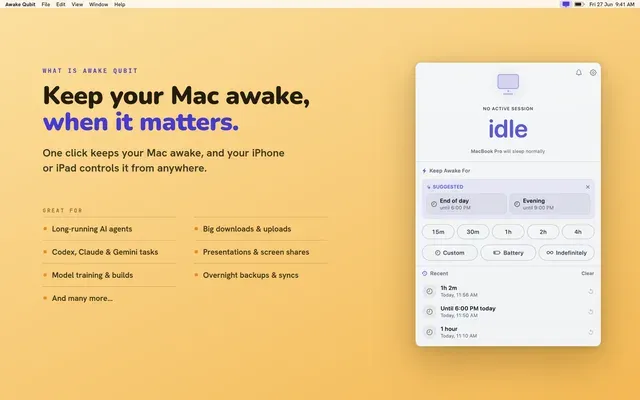
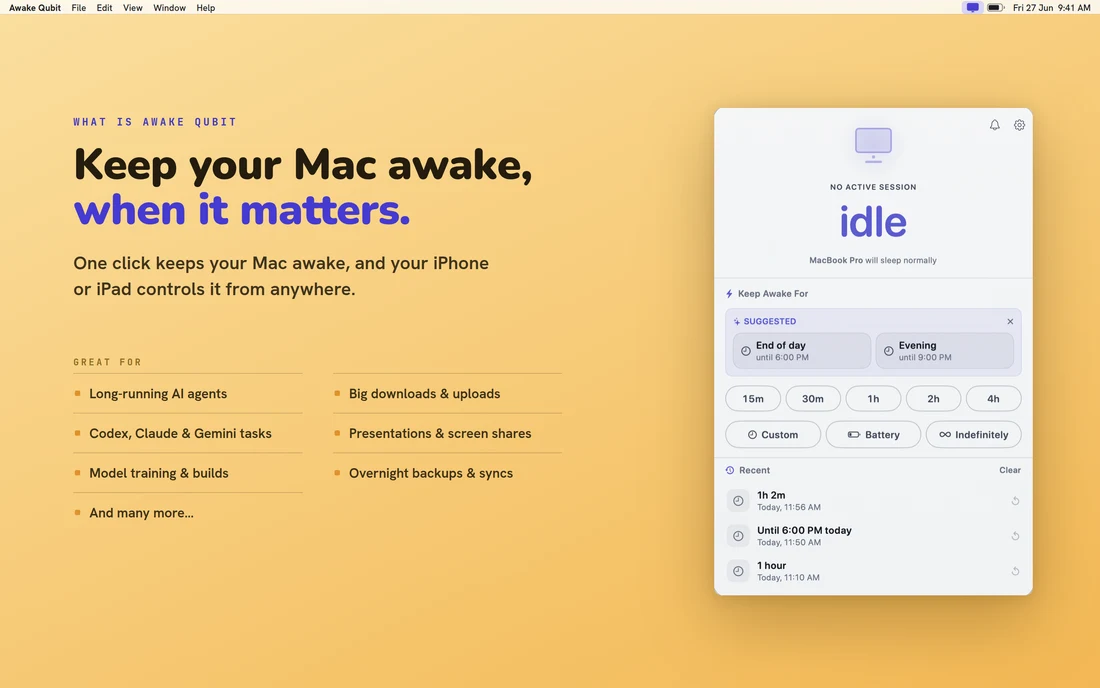
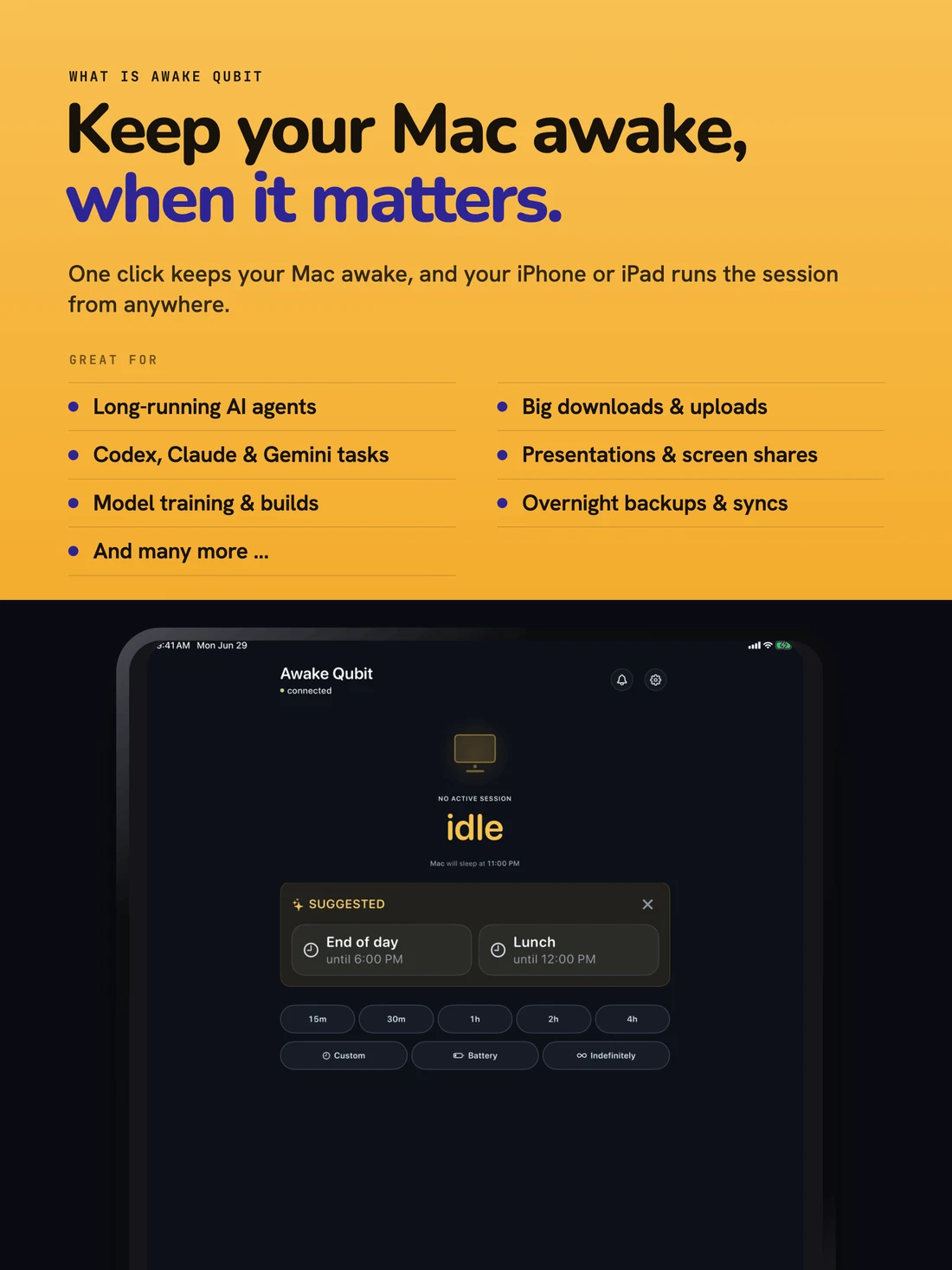
 The idle popover: suggestions, presets and recent sessions in one panel. -
 (view larger)
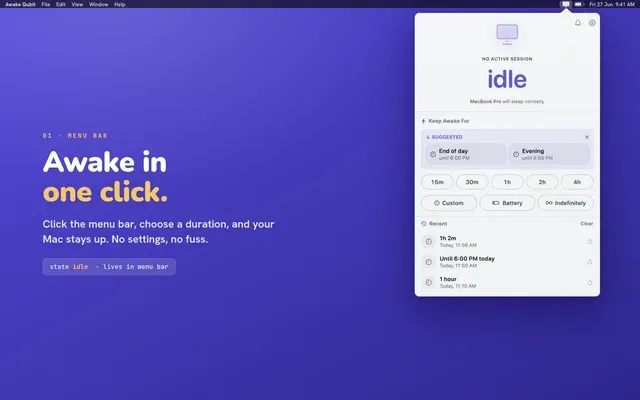
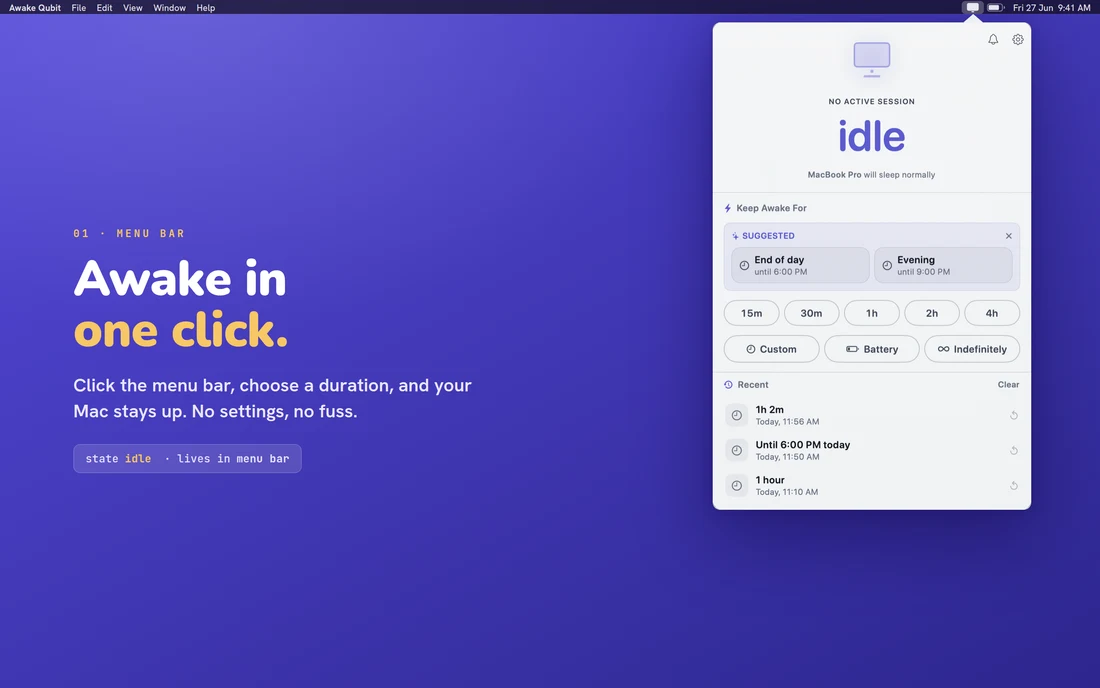
 One click from the menu bar. No window, no dock icon. -
 (view larger)
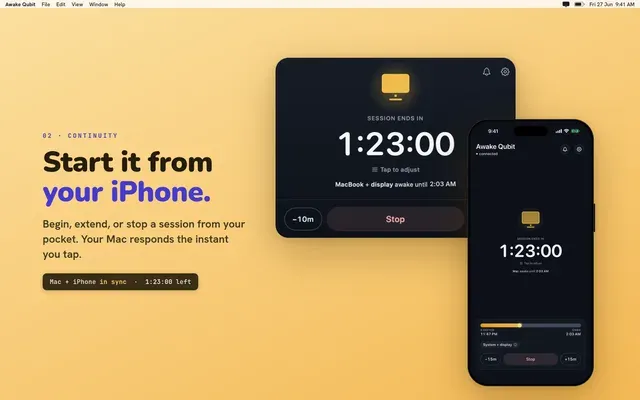
 Mac and iPhone on the same session, the same countdown, at the same moment. -
 (view larger)
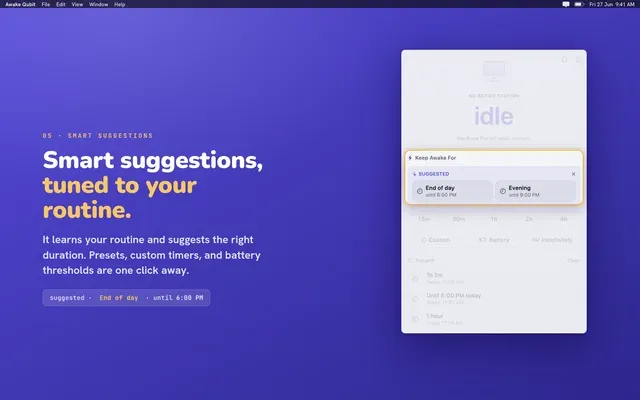
 Suggestions tuned to your routine, with presets and battery thresholds one click away. -
 (view larger)
 Every change logged: started from iPhone, extended, expired, in one timeline. -
 (view larger)
 The activity log on iPhone, down to the minutes added and removed. -
 (view larger)
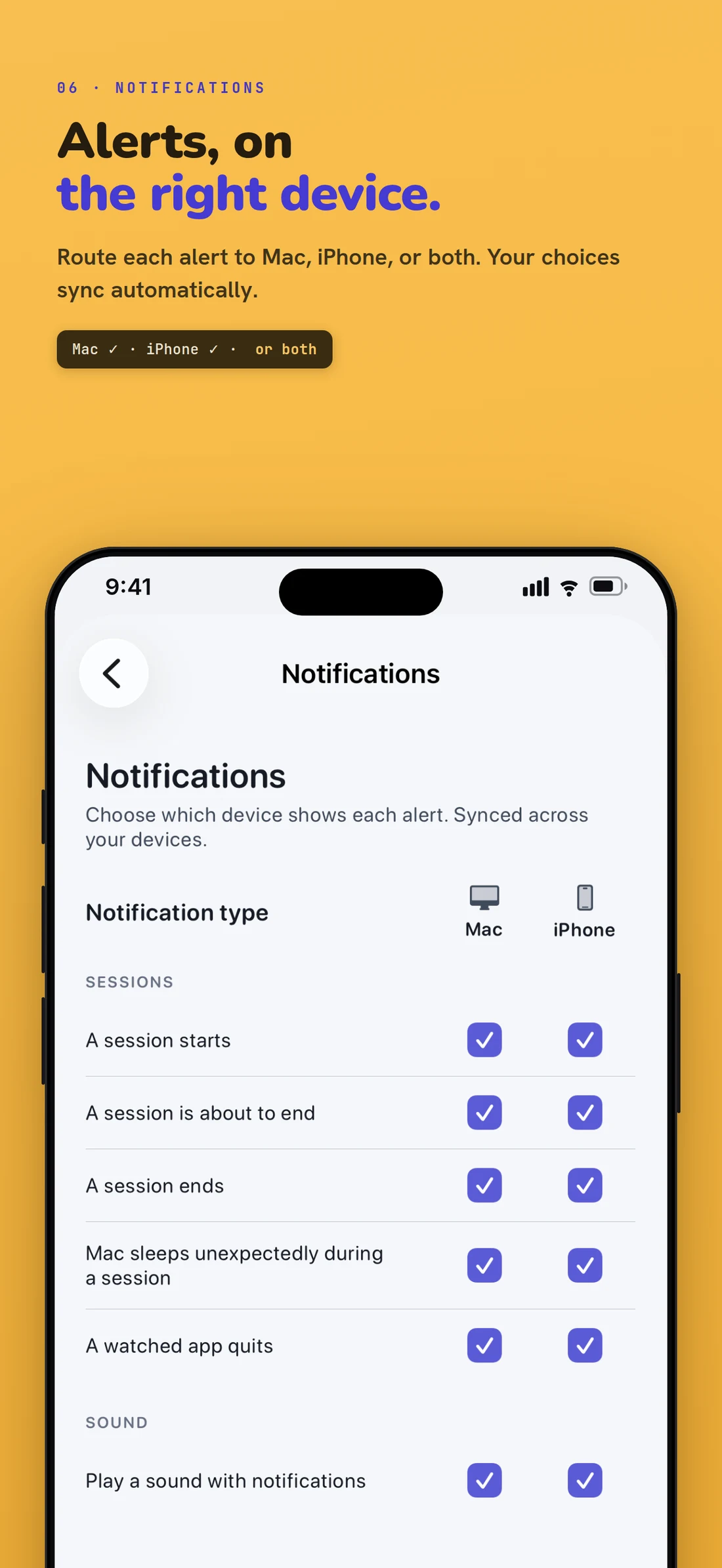
 Choose which device shows each alert: Mac, iPhone, or both. -
 (view larger)
 Alerts that reach a locked phone, in plain language. -
 (view larger)
 On iPad, the full session screen in a readable column.
What to know before you pay.
We'd want to read this before paying, so we put it above the price, not after it.
What it can't do
- Closing the lid still puts your Mac to sleep. Unless an external display is connected, macOS always sleeps when you close the lid, and no App Store app can stop that. If your job has to survive a closed laptop, this app isn't for you, and we'd rather you knew now.
- Your iPhone can't wake a sleeping Mac. Commands only work while the Mac is awake and Awake Qubit is running. A start you send to a sleeping Mac waits until it wakes up.
- It only stops your Mac from sleeping on its own. Putting the Mac to sleep yourself, closing the lid, and macOS's own low-power protections all work exactly as they do today.
- Quitting the Mac app ends the session, on purpose. macOS drops the keep-awake request the moment the app quits, so nothing is ever left running behind you.
- Both devices need the same Apple Account. That's how they find each other. No account to create, no pairing code to type.
- One Mac at a time. This version can't control several Macs from one phone.
- App-linked sessions watch an app, not a task. The session ends when the app quits, not when the job inside it finishes.
- Mouse Wiggler only moves the cursor. It won't make your Mac think you're active, keep your chat status green or stop the screensaver.
- The iPhone and iPad app only works with your Mac. It does nothing without Awake Qubit running on your Mac.
- Remote screen lock needs a one-time permission. You approve Automation and Accessibility access on the Mac once, and the app walks you through it.
What it does with your data
- We are not going to claim we collect nothing. Awake Qubit sends product analytics and crash diagnostics. You can turn analytics off in the app under Settings → About with the "Share Usage Analytics" switch. Minimal data, no ads, and we do not sell your data.
- There is no Awake Qubit account. Your session and device data lives in your own private iCloud rather than on our servers, and the sensitive parts, your device names, the apps you watch and your session history, are stored with field-level encryption only your own devices can unlock.
- Alerts to a locked iPhone pass through a small relay we run. It has no database and does not log message contents. The messages carry your Mac's name, and for watched-app alerts, the name of the app that quit.
- One documented power assertion, fully sandboxed. Through Apple's public IOKit API, the same mechanism as Apple's own caffeinate tool. No helper tool, no daemon, no kernel extension. Uninstall is drag to Trash, and nothing is left behind.
Support email goes to the people who built the app. We aim to reply within one business day, at support@awakequbit.com.
Two apps, one Apple Account, nothing to configure.
- 1
Install Awake Qubit on your Mac.
It lives in the menu bar. No window, no account, no sign-in, and nothing to configure before you start a session. Requires macOS 14 Sonoma or later.
- 2
Get the free app on your iPhone or iPad.
It's a separate free download that works with the Mac app, so the Mac app needs to be running for it to have anything to control.
- 3
Sign both into the same Apple Account.
They find each other automatically through your own private iCloud. No pairing code, no sign-up, no password to give us. There's no Awake Qubit account at all.
The iPhone app doesn't need to stay open for a session to keep running. To uninstall, drag it to the Trash. Nothing is left behind.
The Mac app is free. Pro adds your iPhone.
Everything your Mac does on its own is free forever. Pro adds control from your phone, plus Smart Pause.
- Smart suggestions & recent sessions
- Battery-aware auto-stop
- Session notifications, activity & history
- See what's keeping your Mac awake
- Keep awake for a set time, or until a clock time
- Keep awake while an app runs
- Menu bar quick controls
- Critical safety alerts (overheating, low battery, full disk)
- Mouse Wiggler: moves the cursor when you step away (Mac)
- Monthly $1.99/mo
- YearlyBest value $19.99/yr
- LifetimePay once, keep forever $49.99
- Everything in Free
- iPhone remote control: start, extend, stop, adjust
- Remote screen lock: lock your Mac from your iPhone
- Sleep alerts on your phone when a session ends or your Mac sleeps unexpectedly
- Smart Pause for timed sessions
- Advanced notifications: battery trends & thermal context
- One purchase covers Mac, iPhone and iPad
- Works with Family Sharing
This opens the App Store. The download is free, and the trial starts on the yearly plan inside the app.
Compare Free and Pro
| Feature | Free | Pro |
|---|---|---|
| Smart suggestions & recent sessions | Included | Included |
| Battery-aware auto-stop | Included | Included |
| Session notifications, activity & history | Included | Included |
| See what's keeping your Mac awake | Included | Included |
| Keep awake for a set time, or until a clock time | Included | Included |
| Keep awake while an app runs | Included | Included |
| Menu bar quick controls | Included | Included |
| Critical safety alerts (overheating, low battery, full disk) | Included | Included |
| Mouse Wiggler: moves the cursor when you step away (Mac) | Included | Included |
| iPhone remote control: start, extend, stop, adjust | Not included | Included |
| Remote screen lock: lock your Mac from your iPhone | Not included | Included |
| Sleep alerts on your phone when a session ends or your Mac sleeps unexpectedly | Not included | Included |
| Smart Pause for timed sessions | Not included | Included |
| Advanced notifications: battery trends & thermal context | Not included | Included |
Pro includes everything in Free.